Track Instagram Follower Changes Over Time
Last reviewed:
Reviewed by / developer: TrackFollows
A single Instagram export answers one question: who follows you right now. To know who left, you need an older list to compare it with, and Instagram won't give you one later. An old list only exists if you saved it at the time.
This guide sets up a low-effort routine: export on a schedule, keep the files, and compare two dates. TrackFollows can do the comparison for you in the same browser, and if you'd rather work with the raw files, there are two manual methods at the end.
What one export can and cannot tell you
| Question | One export | Two exports, same settings |
|---|---|---|
| Who doesn't follow me back right now | Yes | Yes |
| Mutual follows | Yes | Yes |
| Followers who disappeared between two dates | No | Yes |
| New followers between two dates | No | Yes |
| Exactly when someone unfollowed | No | No, only "somewhere between the two dates" |
| Anything before your first export | No | No |
The last two rows are the ones people miss. A comparison narrows an unfollow down to "between October 1 and November 1" and no further, and nothing before your first file can be recovered. So the first step isn't comparing. It's taking your first snapshot today.
Set up the routine once
Two exports only compare cleanly when they were made the same way. Decide these four things and stick to them.
- How often: once a month is plenty for most accounts. Add an extra export before and after anything that moves followers, such as a campaign, a collaboration or a post that takes off.
- Settings: Accounts Center → Export your information → Followers and following only, date range All time, format JSON. A shorter date range leaves older followers out, and they'll look like they left. The full steps are in the data download guide.
- File names: Instagram's ZIP name normally includes the export date (something like
instagram-yourname-2026-11-06-….zip). Keep it. If you rename files, put the date in the new name. - Where to keep them: one private folder in cloud storage or on an external drive. The ZIP contains your whole follower list, so keep it out of shared folders.
Step 1: take the first snapshot
Request an export now. When the "ready" notice arrives, download the ZIP and open it on the TrackFollows home page. Check that the follower and following totals are close to what the app shows. A big gap usually means the date range or the selected category was wrong; see why the numbers differ from the app.
Step 2: take the next snapshot
When the next date comes around, export again with exactly the same settings. If you switch format or date range between exports, you'll still get a comparison, but you won't be able to tell a real change from a settings change.
Step 3: compare the two dates
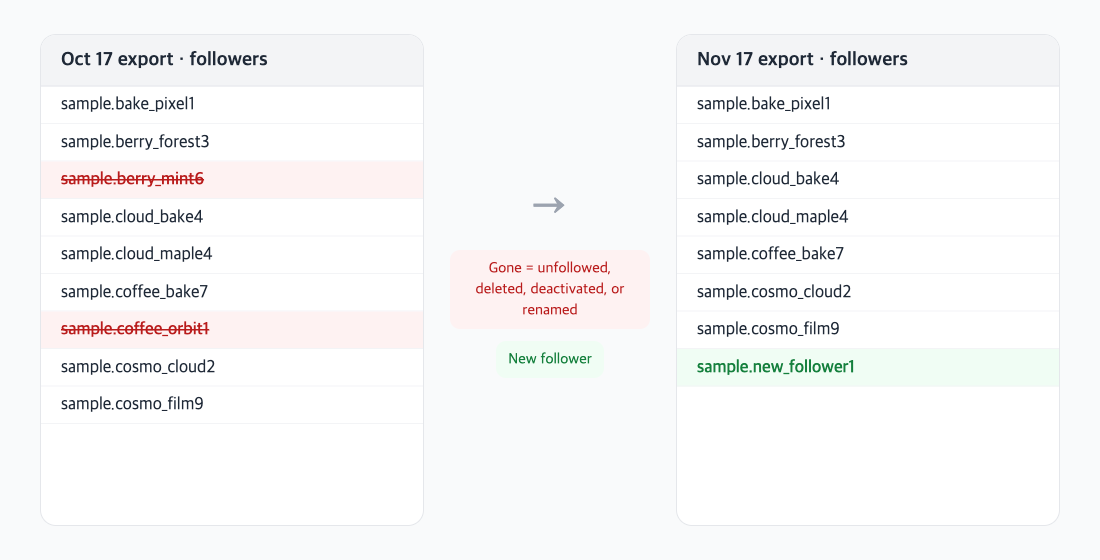
An illustration of comparing followers lists from two dates, using sample accounts.
The easy way: let TrackFollows compare with your last analysis
Open the newer ZIP in the same browser you used for the previous one. The results screen adds a Follower changes box, titled with the two export dates (for example, "Follower changes Oct 6 → Nov 6"), with three lists:
- Unfollowed you: in the older export, missing from the newer one.
- New followers: missing from the older export, present in the newer one.
- Changed username: accounts that look like they left and came back under a new name. TrackFollows matches them by the time they first followed you, so a rename isn't counted as one unfollow plus one new follower.
A few details worth knowing:
- To make this possible, TrackFollows saves only follower and following usernames and the export date in that browser, for up to five analyses. Nothing is sent to a server, and Delete history in the same box clears it.
- The dates shown are when each file was exported, read from the ZIP name. If the name has no date, the date is estimated and marked with ~.
- If you open an older file after a newer one, the changes are still shown in time order, from the older file to the newer one.
- It only compares records that look like the same account, so analyzing a friend's export won't scramble yours.
- Saved history doesn't follow you to another browser, a private window, or a browser where you cleared site data. In those cases, open the older ZIP first and then the newer one, or use one of the manual methods below.
Manual method A: a spreadsheet
- Open each ZIP in TrackFollows and copy the followers list from the results screen.
- Paste the older list into column A and the newer list into column B.
- In C2, enter
=COUNTIF(B:B, A2)and fill down. Accounts in column A with 0 are followers who disappeared. - In D2, enter
=COUNTIF(A:A, B2)and fill down. Accounts in column B with 0 are new followers.
Manual method B: compare the files on the command line
Inside the ZIP, connections/followers_and_following/followers_1.json stores each username at string_list_data[0].value. Larger accounts get several files (followers_2.json and so on), so read them all. With jq installed:
jq -r '.[].string_list_data[0].value' followers_*.json | sort -u > followers-2026-10.txt
comm -23 followers-2026-10.txt followers-2026-11.txt   # there in October, gone in November
Use comm -13 to list accounts that are new. If the file structure looks different from this, check Inside the Instagram export ZIP.
Step 4: work out who actually left
Missing from the newer list doesn't always mean "unfollowed". Open the profile and you'll usually see one of these:
| What you see on the profile | Most likely cause | Count it as a lost follower? |
|---|---|---|
| Profile loads and the button says "Follow" | They unfollowed you | Yes |
| "User not found" or "page isn't available" | Account deleted or deactivated | No, it may come back if restored |
| Same photo and bio under a different name | Username change | No, same person |
| Profile won't open for you but opens for others | Possibly a block | Can't be confirmed from the export |
Instagram's export has been leaving out deactivated and deleted accounts since autumn 2025, so the second row is more common than it used to be. If you compare by hand and the "disappeared" and "new" counts rose by similar amounts, check for renames first.
Look at the other direction too
- Accounts you unfollowed: the export can include a file such as
recently_unfollowed_profiles. It lists unfollows you made, not people who left you. More on that and similar files in the other files in your Instagram export. - Your following list: compare
following.jsonthe same way to see what you followed and dropped. Its entries sit under the top-level keyrelationships_following, so in method B use.relationships_following[].string_list_data[0].value. - Your follow-back ratio: write down the "not following you back" count from each snapshot with its date. Over a few months, the trend says more than any single number.
Limits and cautions
- Anyone who followed and then unfollowed between two exports appears in neither file.
- The timestamps in the lists record when a follow was recorded, not when someone unfollowed.
- All of this works on your own files. Don't use apps or sites that want your Instagram password to "compare for you"; 5 ways to tell if an unfollower app is safe explains why.
- Nobody can see that you exported or compared anything. It only touches your own account data.
Frequently asked questions
I don't have an export from a few months ago. Can I still find out who left since then? No. Instagram doesn't provide past follower lists, and an export only contains the list at the moment you request it. The best you can do is take your first snapshot today.
Can I compare HTML exports? TrackFollows can read them, but JSON is much easier to work with by hand and is what we recommend for this routine. See JSON vs HTML for the differences.
Does TrackFollows keep my ZIP files? No. The files are read in your browser and aren't uploaded. Only the usernames needed to compare with your last analysis are saved, in that browser, and you can delete them at any time.
I got a "Try again later" message after cleaning up my following list. Is that related? Not to the comparison itself, but unfollowing a lot of accounts quickly can trigger limits. How to clean up who you follow without getting limited covers a safer pace.
Related guides