Inside the Instagram Export ZIP: Where Is followers_1.json?
Last reviewed:
Reviewed by / developer: TrackFollows
Extract the ZIP you downloaded from Instagram and you will find several folders and files. It is easy to lose track of which one is your followers list and what the rest are. This article describes the structure of a ZIP exported with only "Followers and following" selected. Instagram can rename files and reorganize folders, so the names below are examples TrackFollows has seen, not a promise that every export looks identical.
Example folder structure
Recent exports commonly look something like this:
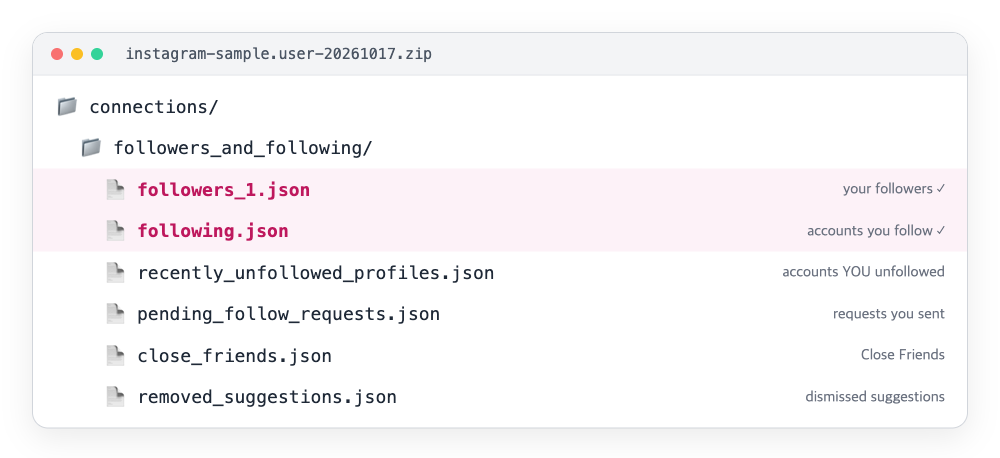
The structure of a sample ZIP drawn like a file browser. The two pink files are the ones used for the comparison.
Older exports sometimes show the followers_and_following folder at the top level without connections. If you chose HTML, the extensions become .html and the names stay mostly the same.
The files a follower comparison needs
followers_1.json — accounts that follow you
This is your followers list. Large accounts may get several files: followers_1.json, followers_2.json, and so on. When you select the ZIP, TrackFollows finds every numbered followers file and combines them. If you use individual file analysis and have several followers files, analyzing the ZIP instead reduces the risk of leaving one out.
following.json — accounts you follow
This is your following list. Comparing it with the followers file gives you mutuals, accounts not following back, and fans. The calculation is explained in how to read your results.
Other files that are easy to misread
These files are not used for the comparison, but knowing what they are prevents misunderstandings. Whether they appear and what they are called depends on when you export and your account settings.
- recently_unfollowed_profiles: accounts you recently unfollowed. It is not a list of people who unfollowed you. This difference is also covered in how to check who unfollowed you.
- pending_follow_requests: requests you sent to private accounts that have not been approved yet. These accounts may not appear in your following list.
- close_friends: your Close Friends list for Stories.
- removed_suggestions: suggested accounts you dismissed.
- blocked_profiles / restricted_profiles: accounts you blocked or restricted.
- Threads folders: the same Accounts Center export can include Threads followers and following. The file names look similar to Instagram's, but they belong to a different service, so TrackFollows excludes files in folders that appear to be Threads-specific, such as
threads.
Finding the files yourself
Computer (Windows or macOS)
- In your downloads folder, double-click the ZIP or choose "Extract all".
- Open
connections→followers_and_following. - Look for
followers_1.jsonandfollowing.json.
iPhone
Tapping the ZIP in the Files app creates a folder next to it. The TrackFollows home page reads the ZIP directly, though, so on iPhone it is simpler to select the ZIP without extracting it.
Android
You can open ZIPs in the My Files (or Files) app. If a downloaded ZIP will not open, it may be damaged; see the Android browser guide and the export troubleshooting guide.
Quick checks when something looks off
A few patterns come up repeatedly when people inspect their exports:
- The followers file is much shorter than expected. Check that the date range was All time. A limited range may include only relationships recorded in that period, so long-time followers can be missing.
- There is no
followers_and_followingfolder at all. "Followers and following" was probably not selected under Customize information. Request a new export with that category checked. - Some files are present but empty. A file like
close_friends.jsoncan legitimately contain an empty list if you never set up that feature. An empty followers file, on the other hand, usually means a different profile or an incomplete export. - The usernames look familiar but the list is not yours. If several profiles are linked in Accounts Center, the export may be for another profile. The ZIP name usually includes the username, so check it before analyzing.
Keeping the file safe
- Do not rename the files. Individual file analysis identifies each file by whether its name contains
followersorfollowing. - Extracting and re-compressing only some files can change the folder structure. Use the original ZIP whenever possible.
- The ZIP contains your username and other people's usernames. Do not share it through public links in messengers or cloud storage, and feel free to delete it when you are done.
- If you also exported photos, messages, or other categories, the ZIP holds far more personal information, so store it with extra care.
What each file is for
| File | Contents | Used for comparison |
|---|---|---|
| followers_1.json (followers_2…) | Accounts that follow you | ✅ |
| following.json | Accounts you follow | ✅ |
| recently_unfollowed_profiles | Accounts you unfollowed | ❌ |
| pending_follow_requests | Requests you sent that are pending | ❌ |
| Threads folders | Threads followers/following | ❌ |
To start with getting the ZIP, see how to download your Instagram data or the unfollower check guide.
Sources