How to Check Who Unfollowed You on Instagram: What You Can and Cannot Know
Last reviewed:
Reviewed by / developer: TrackFollows
"Can I see who unfollowed me?" is one of the most searched Instagram questions. The short answer: Instagram does not offer a feature that tells you when someone unfollows you. What you can do is compare your current followers and following lists, or compare lists from two different points in time. This article separates what each method can and cannot tell you.
First, some definitions
- Not following back: accounts you follow that do not follow you. This includes accounts that never followed you in the first place.
- Unfollower: an account that used to follow you and then stopped. Finding these requires a past list.
- Mutual: accounts that follow each other.
Most "unfollower checker" tools actually show the first group. Keeping these concepts apart prevents a lot of misreading. Each item on the results screen is explained in how to read your results.
Method 1: Check in the app
If you follow only a few accounts, you can check directly.
- On your profile, tap Following.
- Tap the account you want to check to open their profile.
- Open their Following list and search for your username.
If you do not appear, that person does not currently follow you. If their account is private, you can only see the list if they have approved your follow request.
Limits: you have to check one account at a time, which is impractical with hundreds of accounts. You also only see the current state, not whether they followed you before.
Method 2: Compare everything at once with an export
Exporting Followers and following from Instagram's Accounts Center gives you both lists as files. Select the file on the TrackFollows home page to see:
- Accounts in your following list but not in your followers list (not following back)
- Accounts in your followers list but not in your following list (followers you do not follow)
- Accounts in both lists (mutual)
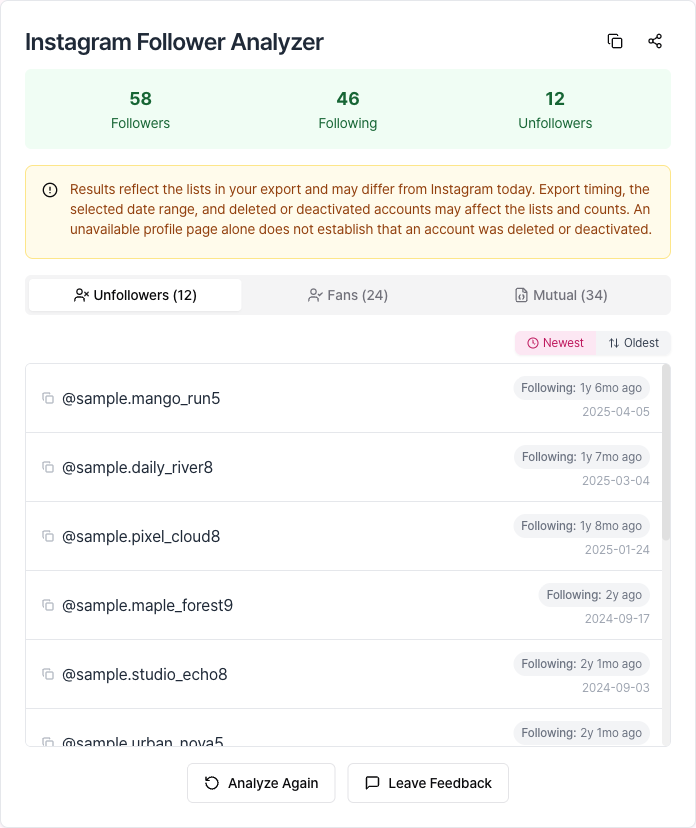
Captured with sample data. Usernames starting with sample. are not real accounts.
Because you only use the official export file and never type your password anywhere, this approach puts little strain on account security. The export process is covered step by step in how to download your Instagram data.
Limits: a single export is a snapshot, so it cannot tell you when someone unfollowed. The date shown in results is the follow date recorded in the file, not an unfollow date.
Method 3: Compare exports from two dates to find "disappeared" followers
To actually find unfollowers, you need a past followers list and a current one.
- Download an export now and keep it with the date in its name, e.g.
instagram-2026-10-17.zip. - A few weeks or months later, export again with the same settings (all time, same format).
- Compare the followers lists and look for accounts that were there before but are gone now.
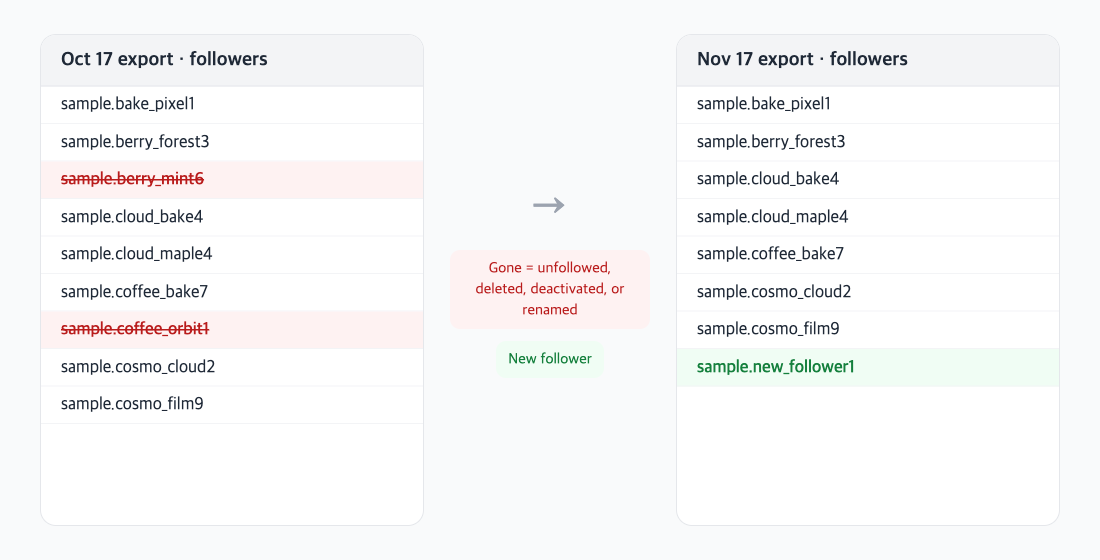
An illustration of comparing followers lists from two dates, using sample accounts.
Accounts found this way may have unfollowed you, deleted or deactivated their account, or changed their username. A username change looks like one account disappearing and a new one appearing, so check suspicious cases by visiting the profile.
Limits: accounts that followed and then unfollowed between the two exports are not caught, and nothing before your first export can be known.
Do not confuse this with "recently unfollowed" files
Depending on when you export, the archive may contain a file such as recently_unfollowed_profiles. That file records accounts you unfollowed, not people who unfollowed you. The meaning of each file in the ZIP is explained in the export ZIP structure explained.
Before you act on the result
- Avoid unfollower apps that ask for your password. The Instagram Help Center warns that apps requesting your login in exchange for likes or followers can read your messages and post spam. Instagram Help Center More in how to choose a safe unfollower app.
- Do not judge a relationship based only on a "not following back" result. They may never have followed you, a follow request may be pending, or their account may be temporarily deactivated.
- Unfollowing many accounts in a short time can lead Instagram to limit your activity. If you want to tidy up, do it gradually.
The three methods compared
| Method | You can see | You cannot see |
|---|---|---|
| In the app | Whether one account follows you now | Past follows; bulk checks |
| One export | Everyone not following back, and mutuals, right now | Who unfollowed and when |
| Two exports compared | Followers who disappeared between the dates | Accounts that followed and left in between |
If you are new, follow the unfollower check guide to get your first export, and keep that file — it is the starting point for any later comparison.
Sources