Instagram Unfollower Apps: 5 Ways to Tell If One Is Safe
Last reviewed:
Reviewed by / developer: TrackFollows
App stores and search results are full of "Instagram unfollower" apps and websites. They look convenient, but some ask you to type in your Instagram username and password. This article shares the criteria we put together while building TrackFollows, along with the security steps recommended by the official Instagram Help Center. To be upfront: TrackFollows is one of the tools that should be judged by these same criteria.
Why are apps that ask for your password risky?
Instagram does not offer a public feature that gives unfollower lists to outside apps. So some apps log in as you with your username and password to collect the lists. That approach causes problems:
- You hand over full account access. The Instagram Help Center warns that apps asking for your login in exchange for likes or followers can read your private messages, see information about your friends, and post spam. Instagram Help Center
- Your account can be restricted. Instagram limits automated collection of information (scraping) and lists giving your password to a third-party app as one of the situations behind such restrictions. Instagram: Why your account was restricted for data scraping
- Reused passwords multiply the damage. If you use the same password for your email or other services, those accounts are at risk too.
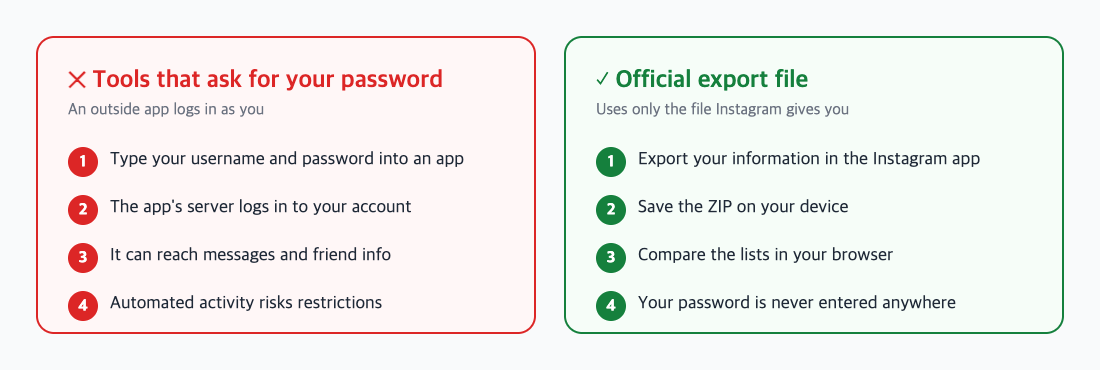
Where your account information goes in each approach.
Five criteria for choosing a safer tool
① It does not ask for your password
This is the most important one. A tool that works with the official Export your information file does not need your Instagram password. If you see a password field, stop there. The export process is in how to download your Instagram data.
② It says where your file is processed
Check whether the service explains if it uploads your file to a server or analyzes it on your device. TrackFollows analyzes the selected file in your browser and does not send the original file, usernames, or follower lists to a server for analysis. Information handled by usage analytics, error diagnostics, and advertising services is described separately in our privacy policy.
③ You can tell who runs it and how to reach them
If you cannot tell who made a service or where to send questions, getting help when something goes wrong is hard. Look for an about page, a privacy policy, and terms of use. Information about who runs TrackFollows is on the about page.
④ It does not make exaggerated promises
Be skeptical of claims like "see who viewed your profile" or "get real-time alerts the moment someone unfollows". Instagram does not provide profile visitor information, and a single export cannot tell you when someone unfollowed. What can realistically be known is explained in how to check who unfollowed you.
⑤ It does not follow or unfollow on your behalf
One-tap mass unfollow features need access to your account, and performing many actions in a short time can lead to restrictions. Keeping "checking the list" separate from "actually unfollowing" is safer.
If you already entered your password
Based on the Instagram Help Center's guidance, we suggest this order:
- Change your password. Change your Instagram password, and also any other service where you used the same one.
- Review login activity. In Accounts Center → Password and security → Where you're logged in, log out of devices you do not recognize.
- Turn on two-factor authentication. In Accounts Center → Password and security → Two-factor authentication, set up text message codes or an authentication app, and store your backup codes somewhere safe. Instagram: Use an authentication app for two-factor authentication
- Remove connected apps and accounts you do not recognize in Accounts Center.
- If you see unusual activity — posts or messages you did not send — follow the Help Center's steps for hacked accounts. Instagram: If you think your account has been hacked
Watch out for phishing, too
Messages like "your account will be suspended for copyright violation" or "log in to get a verified badge" may be phishing. Instagram advises against tapping links in suspicious messages. Check that the address bar shows an instagram.com or facebook.com/meta.com domain, and when in doubt, open the app directly to check your notifications. Instagram: Protect yourself from phishing
Checklist
- Do not use unfollower tools that ask for your password
- Check for the official export file, on-device analysis, and published operator information
- If you already entered it: change your password → clear unknown logins → turn on two-factor authentication
To compare followers and following without a password, follow the unfollower check guide to get your file, then analyze it on the home page.
Sources
- Instagram Help Center: Why you should not use apps that offer likes and followers
- Instagram Help Center: Why your account has been restricted for data scraping
- Instagram Help Center: Use an authentication app for two-factor authentication
- Instagram Help Center: If you think your Instagram profile has been hacked