Instagram Export: JSON vs HTML — Which Format Should You Choose?
Last reviewed:
Reviewed by / developer: TrackFollows
The last choice you make when exporting your Instagram information is the format: HTML or JSON. Both contain the same followers and following information. The difference is whether the file is designed for people to read or for programs to read. This article shows what the two formats actually look like and how the choice affects a follower comparison tool. For the full export process, see how to download your Instagram data.
The difference at a glance
| JSON | HTML | |
|---|---|---|
| Purpose | Data for programs | A document for people to view in a browser |
| Opening it | Hard to read in a text editor (lots of symbols) | Double-click to see a list in your browser |
| Dates | Stored as numbers (Unix time), independent of language | Written as text in the export language (e.g. "Jan 5, 2024 3:12 pm") |
| Reliability for analysis | Consistent structure, fewer errors | Can break if the page layout changes |
| TrackFollows | ✅ Recommended | Supported, but dates may be missing |
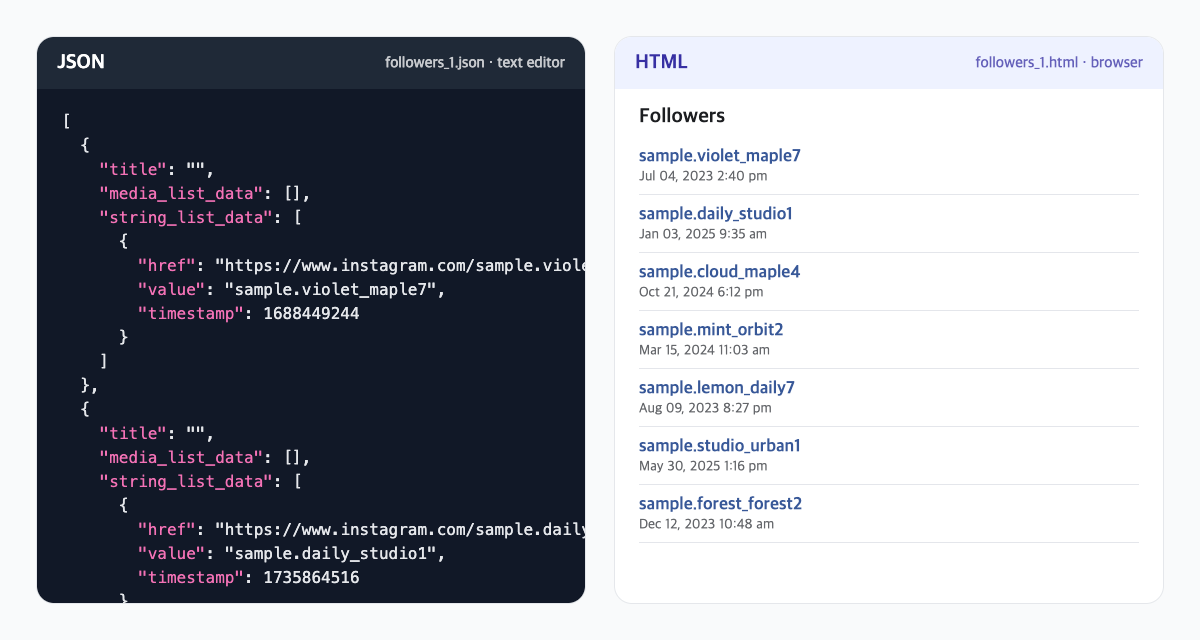
The same sample follower list opened as JSON (left) and HTML (right). The usernames are not real accounts.
What does a JSON file look like?
JSON is a text format that groups information with braces and brackets. Open the followers file (followers_1.json) and you will see a block like this repeated for each account:
{
  "string_list_data": [
    {
      "href": "https://www.instagram.com/example_user",
      "value": "example_user",
      "timestamp": 1704438720
    }
  ]
}
value: the account's usernamehref: the profile URLtimestamp: when the follow relationship was recorded, as the number of seconds since January 1, 1970
The following file (following.json) wraps its list in a key named relationships_following, and in recent exports the username may appear in a title field instead. Instagram can change these details, so treat the example as an illustration, not a guarantee that every file looks exactly the same.
The main advantage of JSON is that dates are stored as numbers. Whether you export in English or Korean, the same number is written, and a program can convert it to the same date in any time zone.
What does an HTML file look like?
An HTML file is a web page. Double-click it and your browser shows a tidy list of usernames and dates. For scanning your records by eye, HTML is more convenient.
For a program, however, it means finding account links and date text among layout code. TrackFollows looks for Instagram profile links in the HTML and interprets the date text right next to each link. That comes with limits:
- Dates are read only when written in English or Korean, such as "Jan 5, 2024 3:12 pm" or "1월 5, 2024 3:12 오후". HTML exported in other languages is still analyzed, but its dates may be empty.
- If Instagram changes the HTML layout, the links may not be found and you may see "Could not read relationships from HTML".
- An account is still included even if its date cannot be read. Missing dates never remove an account from the comparison.
Which one should you choose?
If your goal is comparing followers, choose JSON. The "date recorded in the file" shown in results will be accurate and unaffected by the export language. If you already exported HTML, you can still analyze it; the mutual/not-following-back result itself works. But if sorting by newest or oldest looks meaningless or you get an error, re-exporting in JSON is the simplest fix.
If you want to read your own records, HTML is friendlier. If you need both, you can request two exports. Each request is independent, and downloading one does not remove the other.
Handling the files safely
- If you open a JSON file in a text editor, change it, and save it, a single missing comma can make the whole file unreadable. Open it if you are curious, but do not save it.
- Some phone file apps convert JSON or create preview copies. For analysis, select the original ZIP from your downloads folder.
- Whatever the format, the file contains account information, so do not post it publicly.
- The date shown is when the follow was recorded, not when someone unfollowed. Interpreting results is covered in how to read your results.
Bottom line
- JSON: built for programs, dates are numbers and language-independent, recommended for analysis
- HTML: easy for people to read, dates depend on the export language and may be missing
- An HTML export still works for comparison; re-export in JSON if you need dates
Once you have the ZIP, select it without extracting on the TrackFollows home page. If you extracted it, choose the JSON or HTML files individually in individual file analysis.
Sources