Instagram Export: Requests and Blocked Files
Last reviewed:
Reviewed by / developer: TrackFollows
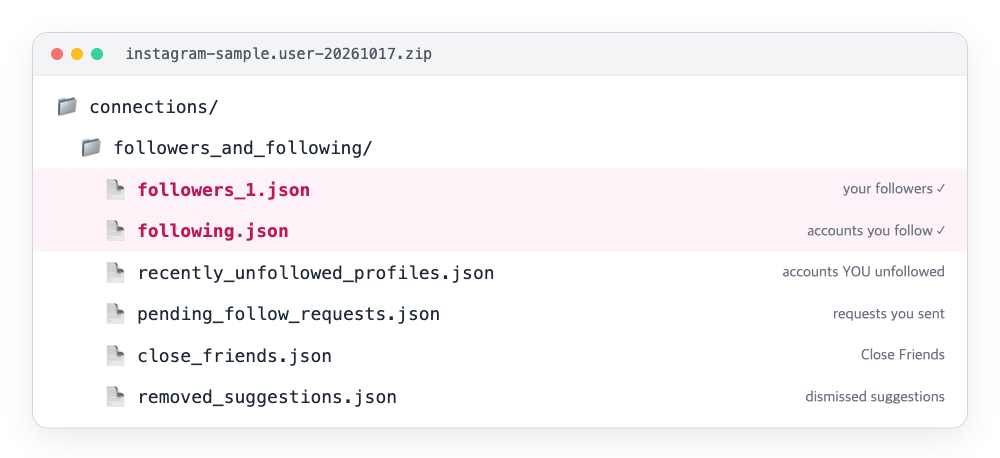
Even if you only select "Followers and following" when you export, the connections/followers_and_following folder holds more than followers_1.json and following.json. Some of the extra files have names that sound like "people who recently unfollowed me", and that's where most confusion starts.
This guide goes through what each of those files actually records, and which one to open when a follower comparison doesn't add up. File names and which files appear depend on when you exported and on your account settings, so treat the names below as examples TrackFollows has seen in real exports, not a fixed list.
At a glance
| File | What it records | Whose action | Common misreading |
|---|---|---|---|
pending_follow_requests | Follow requests you sent that are still waiting | You | Not "people trying to follow you" |
follow_requests_you've_received | Requests to your private account you have not accepted | Them | Not followers until accepted |
recent_follow_requests | Recent follow requests you sent | You | May overlap with pending ones |
recently_unfollowed_profiles | Accounts you recently unfollowed | You | Not people who unfollowed you |
blocked_profiles | Accounts you blocked | You | Not people who blocked you |
restricted_profiles | Accounts you restricted | You | Restricting leaves the follow intact |
close_friends | Your story Close Friends list | You | A subset, not all followers |
hide_story_from | Accounts you hide your story from | You | Different from blocking |
removed_suggestions | Accounts you dismissed from suggestions | You | Unrelated to follows |
following_hashtags | Hashtags you follow | You | Tags, not accounts |
Notice the "Whose action" column: almost every file is a record of something you did. What other people did to you, such as unfollowing or blocking you, is not in the export, because Instagram doesn't share that information. That is why the only way to learn who left is to compare follower lists from two dates.
Follow request files
pending_follow_requests — requests you sent that are waiting
Private accounts you asked to follow that have not accepted yet. These accounts are not in your following list. If your following count in the app feels higher than the count in following.json, you may be counting pending requests as follows. Requests that have been waiting a long time can be withdrawn by tapping "Requested" on the profile; the full walkthrough is in how to see and cancel follow requests you sent.
follow_requests_you've_received — requests you received
Requests to your private account that you have not accepted. Until you accept, they are not followers and are not in followers_1.json. If your follower count seems low on a private account, check this file. On a public account it is usually empty or absent.
recent_follow_requests — your recent requests
A log of requests you sent recently. Some may already have been accepted and become follows. For requests still waiting, use pending_follow_requests.
The most misread file: recently_unfollowed_profiles
The name reads like "accounts that recently unfollowed me", but the content is accounts you recently unfollowed. Typical entries:
- Accounts you unfollowed by hand
- Accounts you dropped after reviewing a comparison result
Accounts that left your following list because they were deleted or deactivated are not in this file.
Reading this file as "people who left" leads to the wrong conclusion. Instagram does not tell you who left; you have to compare an older and a newer followers file yourself. See How to check who unfollowed you and the two-export comparison routine.
Block, restrict and hide files
blocked_profiles — accounts you blocked
This is the list of accounts you blocked. It is widely said that blocking removes the follow in both directions, but we haven't found the Help Center stating that directly (see block vs restrict vs mute). Either way, this file is useful in a two-export comparison: if an account disappeared from your followers and also shows up here, the change most likely came from your block, not from them unfollowing you. Set those accounts aside before counting "lost followers".
restricted_profiles — accounts you restricted
Restricting makes someone's comments and messages less visible, and leaves the follow relationship as it is. Restricted accounts still appear in your follower and following lists. They are not told they were restricted.
hide_story_from — accounts you hide your story from
These accounts cannot see your stories but remain followers. Unlike blocking, they can still see your posts.
The remaining files
- close_friends: your story Close Friends list, a hand-picked subset of followers. If someone is in Close Friends but not in the followers file, they unfollowed you or their account is gone.
- removed_suggestions: accounts you dismissed from the suggestions screen. No effect on follows; it only steers recommendations.
- following_hashtags: hashtags you follow. They are not accounts and do not count toward following.
Using these files to explain an odd comparison
| What looks off | File to check first | Explanation when it matches |
|---|---|---|
| Export's following count lower than you expected from the app | pending_follow_requests | Pending requests mistaken for follows |
| Few followers on a private account | follow_requests_you've_received | Unaccepted requests are not followers |
| Some disappeared followers unexplained | blocked_profiles | You blocked them, so the change likely came from you |
| Someone in Close Friends is not a follower | close_friends + followers_1.json | They unfollowed or deleted the account |
| Familiar names in the "recently unfollowed" file | recently_unfollowed_profiles | Those are unfollows you made |
Handling the files
- TrackFollows doesn't analyze these files. It reads only the followers and following lists from the ZIP (and, if present, the separate Threads lists; see checking your Threads followers).
- They share the structure of the follower files: each entry has the username at
string_list_data[0].valueand atimestampfor when the action was recorded. The timestamp is when you requested, blocked or unfollowed, not when the other person did anything. - Block and restrict lists are likely information you would not want shared. Keep the ZIP out of shared folders.
Frequently asked questions
Is there a list of people who blocked me? No. The export records only your own actions. If someone blocks you, nothing in your export says so. At most, you may notice their account missing from a later followers file, which looks the same as an unfollow or a deactivated account.
My file names differ from this article.
Instagram has renamed files over time. Older exports used names ending in accounts, such as blocked_accounts and recently_unfollowed_accounts. The meaning is the same.
Do HTML exports contain the same files?
Yes, with an .html extension and the same names and content. JSON is easier to compare by hand.
Related guides
- Inside the Instagram Export ZIP: Where Is followers_1.json?
- A routine for comparing two data exports
- Instagram Followers and Unfollowers: 12 Frequently Asked Questions
- How to see and cancel follow requests you sent
Sources